Raster Data Exercise
Introduction
In this exercise, you will develop a spatial habitat suitability model to identify potential chamois habitats in the Canton of Lucerne. This multi-criteria analysis will combine your knowledge of vector and raster data processing, spatial analysis, and ecological modeling.
Ecological Background
Chamois (Rupicapra rupicapra) are mountain ungulates native to European mountain ranges. Understanding their habitat requirements is crucial for conservation planning. Based on ecological research, chamois have the following habitat requirements:
- Home range size: Approximately 1 km²
- Forest cover: Require sufficient forest within their home range for refuge and thermal protection
- Steep terrain: Need steep areas (> 30°) where they have physiological advantages over predators
- Human disturbance: Avoid human settlements and heavily trafficked roads
Analytical Workflow
Figure 9.1 shows the complete workflow for this analysis. Study this process model carefully - it will guide you through the entire exercise. The process model is also available as a high-resolution PDF on Moodle.
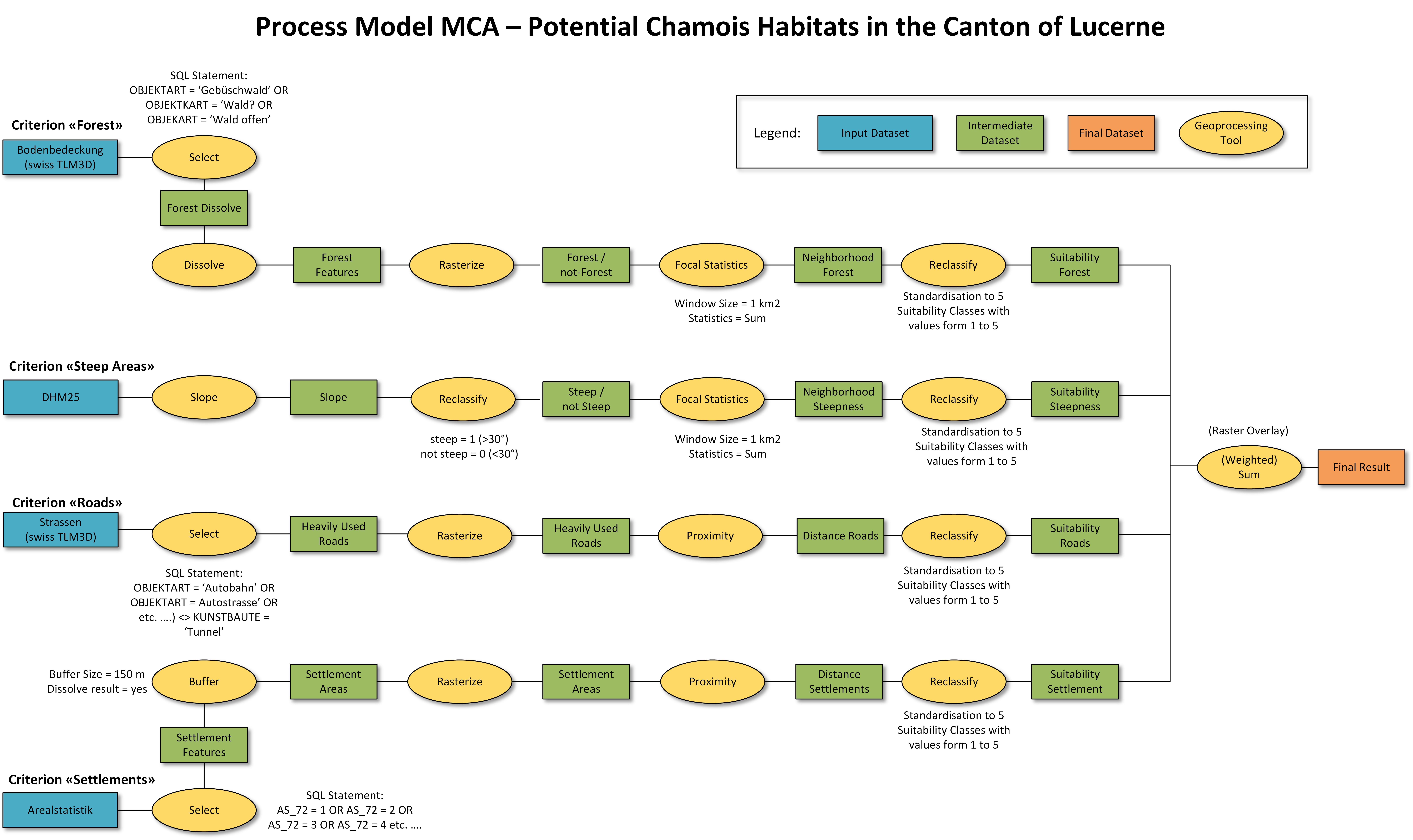
Before you begin, take time to understand:
- What input datasets are needed?
- What geoprocessing steps will you perform?
- How do the steps connect to each other?
- What is the final output?
Your task is to implement this workflow using R, combining vector and raster analysis techniques to produce a habitat suitability map.
Task 1: Data Exploration and Project Setup
Setup Your Workspace
- Create a new R Project
- Download the exercise data from Moodle (section “CW 39 – Spatial Analysis II”)
- Extract the data into your new folder
- Create a new R script or Quarto document for this exercise
Understanding Your Data
Your downloaded data folder contains several datasets:
- Raster data:
dhm25_lu.tif- Digital elevation model at 25m resolution
- Vector data (in GeoPackages):
tlm_bb(polygon layer) - Land cover classification from swiss_TLM3.gpkgtlm_strassen(line layer) - Road network from swiss_TLM3.gpkgarealstatistik(point layer) - Swiss land use statistics from Arealstatistik.gpkgkantonsgebiet_lu(polygon layer) - Canton boundary from swissBOUNDARIES3D.gpkg
Metadata Resources
Understanding your data is crucial for proper analysis. Familiarize yourself with these metadata sources:
- DHM25: Data source & description
- swissTLM3D: Data source & description | Objektkatalog (2024)
- Arealstatistik BFS: Data source & description | Nomenklatur 72 Grundkategorien
You’ll need the following packages for this exercise:
sffor vector dataterrafor raster datadplyrfor data manipulationggplot2ortmapfor visualisation
Your First Tasks
Load the data and explore its properties. Consider these questions:
- What coordinate reference system (CRS) are the datasets using?
- What is the spatial extent and resolution of the elevation model?
- What attributes are available in each vector layer?
- Do all datasets cover the same geographic area?
Create a visualization to familiarize yourself with the data.
Task 2: Create a Forest Cover Raster
Objective: Convert the vector-based land cover layer (tlm_bb) into a raster format that represents forest areas. This raster will serve as one of your habitat suitability criteria.
Background: Before proceeding, consult the swissTLM3D Objektkatalog to understand the classification system. The land use types are stored in the field “OBJEKTART” (see TOPIC TLM_BB).
Which OBJEKTART categories represent forest that chamois would use for refuge? Consider different forest types and their characteristics.
Workflow Steps
Your task involves several sequential operations:
- Select forest features - Filter the
tlm_bblayer to extract only forest-related land cover types - Dissolve boundaries - Merge all forest polygons into a single multipart feature
- Rasterize - Convert the vector layer to raster format using the DHM25 as a template
- Validate - Examine the output to ensure it’s correct
For this analysis, consider these forest types as suitable chamois habitat: - Gebüschwald - Wald - Wald offen
When rasterizing: - Use the DHM25 as a template to ensure matching extent and resolution - The terra package has a rasterize() function - You may need to convert sf objects to terra’s vect format - Consider what value to assign to forest cells (e.g., 1 = forest)
Examine the properties of your forest_raster. Is it an integer or floating-point raster? What values does it contain? Why might this matter for subsequent analyses?
Task 3: Derive Terrain Slope
Objective: Calculate slope from the digital elevation model. Slope is a critical habitat parameter - chamois use steep terrain as refuges where they have physiological advantages over predators.
Background: Slope represents the rate of change in elevation and can be calculated from a DEM using neighborhood operations. The terra package provides the terrain() function for this purpose.
- The
terrain()function requires specifying which terrain variable to calculate (e.g., “slope”, “aspect”) - Choose appropriate units for your analysis (degrees vs. radians)
- The output will be a floating-point raster
- What data type is the slope raster? Why does this differ from the forest raster?
- What is the steepest slope in your study area? Is this realistic?
- Where would you expect to find the steepest slopes?
Task 4: Identify Steep Terrain
Objective: Reclassify the continuous slope values into a binary classification: steep vs. non-steep areas. Based on ecological studies, chamois benefit from slopes steeper than 30°.
Background: Reclassification transforms continuous data into categorical classes. You’ll create a binary raster where: - 0 = non-steep areas (0-30°) - 1 = steep areas (>30°)
The classify() function uses a reclassification matrix with three columns: - Column 1: Lower bound of range - Column 2: Upper bound of range - Column 3: New value to assign
Remember to use include.lowest = TRUE to handle boundary values correctly.
Task 5: Extract High-Traffic Roads
Objective: Identify heavily trafficked roads that chamois would avoid. While we don’t have direct traffic volume data, we can use road type as a proxy for traffic intensity.
Background: Consult the swissTLM3D Objektkatalog to understand the road classification system. The OBJEKTART field contains road type information, and the KUNSTBAUTE field indicates infrastructure like tunnels.
Why should roads in tunnels be excluded from this analysis? Think about how chamois would perceive and respond to different road types.
Major road types that typically carry high traffic: - Autobahn (highways) - Autostrasse (expressways) - 10m, 8m, 6m, 4m Strasse (roads classified by width) - Einfahrt, Ausfahrt, Zufahrt (on/off ramps and access roads)
Exclude roads where KUNSTBAUTE equals “Tunnel”.
Task 6: Delineate Settlement Areas
Objective: Create a spatial layer representing human settlement areas that chamois would avoid. You’ll use the Swiss Land Use Statistics (Arealstatistik) dataset for this purpose.
Background: The Arealstatistik provides detailed land use information at the hectare level. The dataset uses a classification system with 72 basic categories (see Nomenklatur 72 Grundkategorien).
Before looking at the hint below, download and examine the variable list (xlsx-file) - specifically the sheet “Codes AS_72”.
Think about: Which categories represent areas where human activity would disturb chamois? Consider different types of buildings and their surroundings (in German, “Umschwung” refers to the area immediately surrounding buildings).
For this analysis, consider these categories as settlement areas: - 1: Industrie- und Gewerbegebäude - 2: Umschwung von Industrie- und Gewerbegebäuden - 3: Ein- und Zweifamilienhäuser - 4: Umschwung von Ein- und Zweifamilienhäusern - 5: Reihen- und Terrassenhäuser - 6: Umschwung von Reihen- und Terrassenhäusern - 7: Mehrfamilienhäuser - 8: Umschwung von Mehrfamilienhäusern - 9: Öffentliche Gebäude - 10: Umschwung von öffentlichen Gebäuden - 11: Landwirtschaftliche Gebäude - 13: Nicht spezifizierte Gebäude
Workflow
Your analysis should:
- Filter the Arealstatistik points to extract settlement-related categories
- Buffer these points by 150 meters (representing a zone of human influence)
- Dissolve overlapping buffers to create contiguous settlement areas
The Arealstatistik uses point samples at hectare intervals. Buffering creates a more realistic representation of settlement extent and the zone of human disturbance around settlements.
Task 7: Analyze Local Habitat Characteristics
Objective: Evaluate the landscape surrounding every location in terms of forest cover and steep terrain availability. This analysis accounts for the chamois home range size (~1 km²) by examining the local neighborhood around each potential habitat location.
Conceptual Background
Chamois don’t just need forest and steep slopes - they need sufficient amounts of these resources within their home range. A focal (moving window) analysis evaluates each cell by examining its neighborhood, essentially asking: “If a chamois lived here, would there be enough resources within its typical home range?”
- Why is it not enough to simply identify where forests and steep slopes exist?
- How does home range size influence habitat suitability?
- What does it mean if a location has high forest cover within 1 km² but no steep slopes nearby?
Data Preparation
Before conducting focal statistics, you need to handle NA (no data) values. Binary rasters (forest/non-forest, steep/non-steep) need to explicitly represent “absence” as 0 rather than NA.
Use the classify() function with a reclassification matrix that maps NA to 0:
new_raster <- classify(old_raster, cbind(NA, 0))Calculate Window Size
To represent a 1 km² home range, you need to determine the appropriate window size in raster cells.
Given: - Home range area = 1 km² = 1,000,000 m² - Raster resolution = 25m × 25m = 625 m² per cell - Number of cells needed = 1,000,000 m² ÷ 625 m²/cell = ? - Window dimensions (assuming square window) = √(number of cells) = ?
Calculate this yourself, then check the code below.
Perform Focal Analysis
The focal analysis counts how many forest cells (or steep cells) exist within the moving window around each location.
The focal() function requires: - Input raster - Weight matrix (w) - use matrix(1, nrow=size, ncol=size) for equal weights - Function to apply (fun = "sum" to count cells with value 1) - na.rm = TRUE to handle any remaining NA values
Focal analysis results showing local resource availability
The output values typically range from 0 to ~1500-1600.
Think about: - What does a value of 0 mean? What about 1600? - Why might the maximum be less than 1600 (the theoretical maximum)? - Which areas have the highest forest counts? Highest steep terrain counts? - How do these patterns relate to the topography of Canton Lucerne?
Task 8: Calculate Distance to Human Disturbance
Objective: Quantify how far each location is from human disturbance sources (settlements and major roads). Chamois are sensitive to human activity, so greater distances should indicate better habitat quality.
Background: Distance calculations create continuous surfaces where each cell’s value represents its proximity to the nearest feature. This allows you to model avoidance behavior - animals may select habitat based on distance to disturbance sources.
How is a distance-based criterion different from the binary (present/absent) classification we used for forest and steep areas? Why use distance rather than simply excluding areas near roads and settlements?
Workflow
To calculate distances in a raster environment:
- Rasterize vector features (roads and settlements)
- Calculate Euclidean distance from each cell to the nearest feature
- Analyze the resulting distance surfaces
The terra distance() function: - Takes a raster where features are marked with values (typically 1) - Calculates the straight-line distance from each cell to the nearest non-NA cell - Returns distances in map units (meters for EPSG:2056)
Distance surfaces from human disturbance sources
- What are the maximum distances to roads and settlements in your study area?
- Where would you expect to find the most remote areas?
- How might chamois use areas at different distances from human activity?
- Could there be areas that are too remote for chamois? What other factors might limit habitat beyond distance to disturbance?
Task 9: Standardize Criteria to Common Scale
Objective: Transform all four habitat criteria onto a common suitability scale, enabling meaningful comparison and combination of different environmental factors.
The Standardization Problem
You now have four criteria measured in different units: - focal_forest: count of forest cells (0-1600) - focal_steepness: count of steep cells (0-1600) - distance_roads: meters (0-several thousand) - distance_settlement: meters (0-several thousand)
Why can’t we directly combine these raw values? What problems would arise if we simply added them together?
Consider: - A location with 500 forest cells + 500 steep cells + 5000m from roads + 3000m from settlements = 9000 - Another location with 100 forest cells + 100 steep cells + 200m from roads + 100m from settlements = 500
Does the first location really have 18× better habitat? How do the different measurement units affect interpretation?
Solution: Suitability Classification (Grading)
Standardize all criteria using a common five-class suitability scale:
- 1 = unsuitable
- 2 = conditionally suitable
- 3 = moderately suitable
- 4 = well suitable
- 5 = very well suitable
Classification Thresholds
The following thresholds are based on ecological considerations and expert knowledge:
focal_forest (cell count within 1 km²):
- 0 - 300 → 1 (unsuitable: <20% forest)
- 300 - 600 → 2 (conditional: 20-37%)
- 600 - 900 → 3 (moderate: 37-56%)
- 900 - 1200 → 4 (good: 56-75%)
- 1200 - 2000 → 5 (excellent: >75%)
focal_steepness (cell count within 1 km²):
- 0 - 200 → 1 (unsuitable: <12% steep)
- 200 - 400 → 2 (conditional: 12-25%)
- 400 - 600 → 3 (moderate: 25-37%)
- 600 - 800 → 4 (good: 37-50%)
- 800 - 2000 → 5 (excellent: >50%)
distance_roads (meters):
- 0 - 150 → 1 (unsuitable: very close)
- 150 - 300 → 2 (conditional: close)
- 300 - 450 → 3 (moderate: medium distance)
- 450 - 600 → 4 (good: far)
- 600 - 20000 → 5 (excellent: very far)
distance_settlement (meters):
- 0 - 250 → 1 (unsuitable: very close)
- 250 - 500 → 2 (conditional: close)
- 500 - 750 → 3 (moderate: medium distance)
- 750 - 1000 → 4 (good: far)
- 1000 - 20000 → 5 (excellent: very far)
These classifications represent ecological hypotheses about chamois habitat preferences.
Questions to consider: - Are these thresholds reasonable? - How might you validate or refine them? - Should all criteria have equal weight in the final analysis? - How sensitive might the results be to these classification boundaries?
Perform the Reclassifications
Now apply these classification schemes to each criterion. You’ll use the same reclassification approach you learned earlier.
Visualize and Compare
Examine all four standardized criteria side-by-side:
Now that all criteria are on the same scale (1-5), you can meaningfully compare them.
Look for: - Which criterion shows the most variability? - Which areas score high on multiple criteria? - Are there any surprising patterns? - How do topographic factors (forest, slope) relate to human factors (roads, settlements)?
Task 10: Multi-Criteria Overlay Analysis
Objective: Combine all four standardized criteria into a single habitat suitability map using raster overlay analysis.
Conceptual Background
Now that all criteria are on a common 1-5 scale, you can combine them to identify areas that satisfy multiple habitat requirements simultaneously. This is the essence of Multi-Criteria Evaluation (MCE).
We’ll use a simple additive model (sum of all criteria).
Consider: - What assumptions does this make about how criteria interact? - Does it assume all criteria are equally important? - Could two moderate scores compensate for one poor score? - What’s the theoretical range of output values? (Min = ?, Max = ?)
Perform the Overlay
One of the great advantages of raster data is that map algebra is straightforward - you can use standard arithmetic operators:
Analyze the Results
The sum values range from 4 (all criteria scored 1) to 20 (all criteria scored 5).
What does this mean? - 4-8: Poor habitat - multiple limiting factors - 9-14: Moderate habitat - mixed conditions - 15-20: Excellent habitat - all requirements met
Do you observe the full range in your study area? Why or why not?
Visualize the Habitat Suitability Map
Create Simplified Classification
For management and communication purposes, create a three-class version:
Examine your final map carefully:
- Where are the most suitable habitats located?
- What geographic features characterize high-suitability areas?
- Are there surprising results? Areas you expected to be suitable that aren’t, or vice versa?
- How contiguous are the suitable habitat patches?
Task 11: Model Validation and Critical Evaluation
Objective: Critically evaluate your habitat suitability model by comparing it with actual chamois distribution data and calculating quantitative statistics.
Final Data Processing
Create a final, polished version of your suitability map:
Calculate Habitat Availability
Quantify how much suitable habitat exists in each suitability class:
- What percentage of Canton Lucerne is “highly suitable” for chamois?
- How much area is in each category?
- Does this match your expectations based on the canton’s geography?
Compare with Actual Distribution
Now validate your model against reality. Visit the Info Fauna database to view actual chamois observations:
Chamois Distribution Map - Info Fauna
Compare your suitability map with the actual distribution:
Questions to consider: 1. Do areas with high predicted suitability show actual chamois presence? 2. Are there areas you predicted as suitable but have no observations? Why might this be? 3. Are there observed chamois in areas your model predicts as unsuitable? What factors might your model be missing? 4. How well does your model capture the overall distribution pattern? 5. What are the main sources of agreement and disagreement?
Important: Absence of observations doesn’t always mean absence of animals - consider sampling effort, accessibility, and data reporting biases.
Critical Discussion
Model Limitations and Improvements
Your model makes several simplifying assumptions. Consider these limitations and potential improvements:
1. Equal Weighting of Criteria
Current approach: All four criteria contribute equally (simple sum).
Questions: - Is forest cover really as important as distance to settlements? - Should steep terrain be weighted more heavily, as it’s a primary anti-predator strategy? - How could you determine appropriate weights?
You could modify the overlay to use weights:
# Example: assign different importance weights
weighted_suitability <- 0.3*grading_forest + 0.3*grading_steepness +
                        0.2*grading_roads + 0.2*grading_settlement
2. Classification Thresholds
Current approach: Fixed thresholds based on general ecological principles.
Improvements: - Calibrate thresholds using actual chamois location data - Use statistical methods (e.g., resource selection functions) - Incorporate uncertainty in threshold definitions - Test sensitivity to different threshold values
3. Missing Criteria
What factors did we omit?
- Elevation: Chamois prefer specific elevation ranges (typically 1000-3000m in Alps)
- Aspect: South-facing slopes have less snow and earlier vegetation
- Vegetation type: Not all forests are equal - species composition matters
- Snow depth: Critical for winter survival and accessibility
- Rock/cliff presence: Provides additional escape terrain
- Recreation areas: Hiking trails, ski resorts, climbing areas
- Seasonal access: Different impacts in winter vs. summer
- Hunting pressure: Legal hunting affects distribution
- Historical presence: Where have chamois traditionally been?
- Predators: Lynx, wolf distribution
- Competitors: Red deer, ibex overlap
- Disease: Presence of keratoconjunctivitis or other diseases
4. Compensatory vs. Limiting Factors
Current model: Allows compensation - high scores on some criteria can offset low scores on others.
Ecological reality: Some factors may be limiting - absolutely required regardless of other conditions.
Should the model allow an area with zero steep terrain but excellent forest cover to be classified as “suitable”? Or is steep terrain a non-negotiable requirement?
You could implement threshold constraints:
# Example: require minimum steepness
suitable_habitat <- grading_sum
suitable_habitat[grading_steepness < 3] <- NA  # Exclude areas without adequate steep terrain
Data Quality Considerations
Spatial Resolution
- Is 25m appropriate for modeling home ranges of ~1 km²?
- How does resolution affect focal analysis results?
Temporal Mismatch
- Are all datasets from the same time period?
- Have land use patterns changed since data collection?
Data Accuracy
- How accurate is the land cover classification?
- Are road and settlement data complete and current?
Scale Dependencies
Chamois habitat selection operates at multiple scales: - Regional scale: Climate, elevation zones - Landscape scale: Home range characteristics (what we modeled) - Local scale: Specific feeding sites, bedding areas
Your model addresses primarily the landscape scale. Results might differ at other scales.
Extension Ideas
If you want to take this analysis further:
1. Remove Water Bodies
2. Add Elevation Constraints
3. Conduct Sensitivity Analysis
Test how results change with different: - Classification thresholds - Criterion weights - Home range window sizes - Inclusion/exclusion of criteria
4. Validate Quantitatively
If you have access to presence/absence data: - Calculate AUC (Area Under Curve) or similar metrics - Perform cross-validation - Test predictive accuracy
Concluding Thoughts
As a GIS analyst, you must:
✓ Acknowledge limitations - No model is perfect; be transparent about assumptions and constraints ✓ Validate results - Compare predictions with empirical data whenever possible ✓ Consider context - Understand the ecology, not just the technical methods ✓ Communicate uncertainty - Decision-makers need to know confidence levels ✓ Document thoroughly - Future users must understand your methodology
Remember: A beautiful map doesn’t necessarily represent reality. Critical thinking and validation are essential.
Summary of Key Concepts
Through this exercise, you’ve learned:
- Vector to raster conversion - Transforming different data types for analysis
- Terrain analysis - Deriving slope from elevation data
- Reclassification - Converting continuous and categorical data
- Focal analysis - Neighborhood operations for landscape context
- Distance calculation - Euclidean distance surfaces
- Multi-criteria evaluation - Standardization and overlay of disparate criteria
- Model validation - Comparing predictions with observations
- Critical evaluation - Understanding limitations and assumptions
These skills are fundamental to spatial analysis and transferable to many other applications beyond wildlife habitat modeling.